Token spend is a line you control
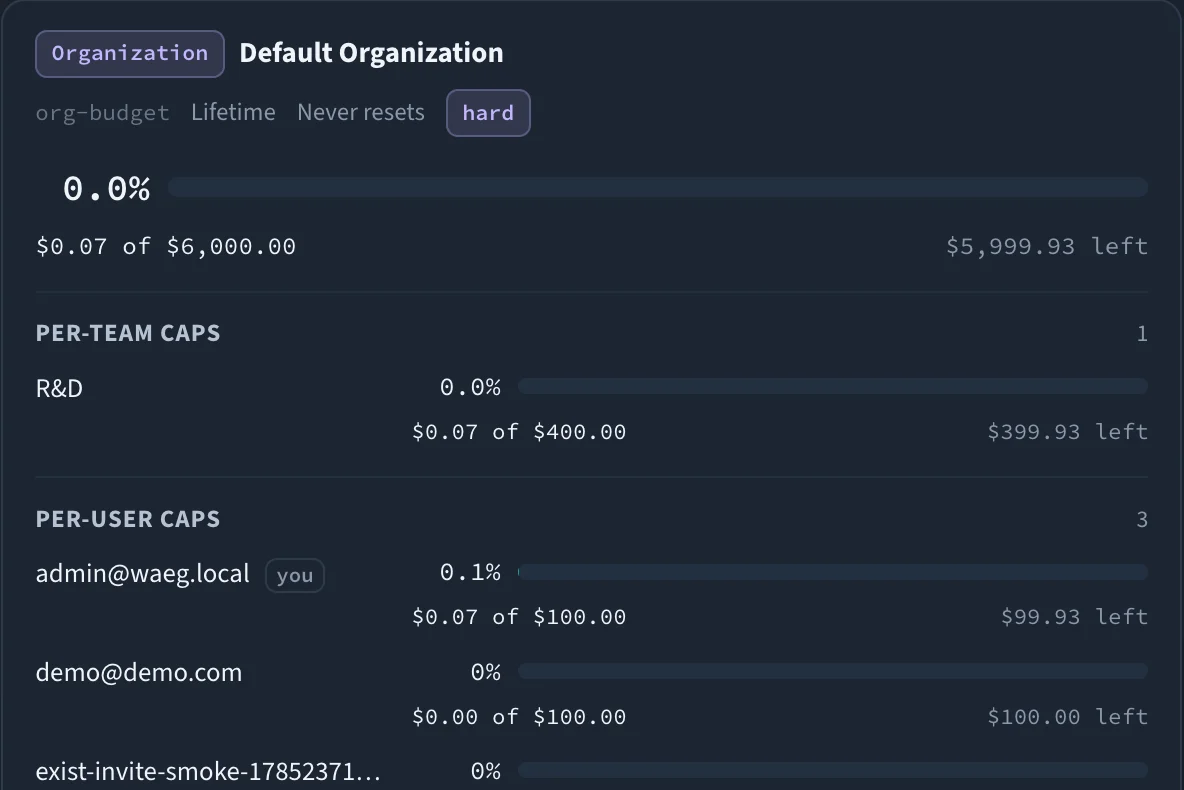
Stacked spend and rate limits across org, team, user, application, model and key — with fair-share caps, soft-budget alerts, and FinOps dashboards. Every request is checked against every matching counter, and the first violation is refused.
"Stacked spend and rate limits across org → team → user → app → model → key — the first violation is refused."
Stacked hierarchy
Spend and rate limits across org → team → user → application → model → key. Every request is checked against all matching counters, and the first violation rejects it.
Fair-share caps
Subgroup caps like per-team, per-user and per-application dollars guarantee fair share, so one team can never burn the whole org pool.
Virtual keys
Per-key, per-team, and per-user token and dollar budgets, RPM limits, and model allow-lists — with user or service owner types for clean attribution.
Soft budgets & alerts
Warn at a percentage threshold over a webhook before hard limits start rejecting traffic. See the wall coming before you hit it.
FinOps dashboards
Spend by tenant, model, provider, and key. An importable price book (offline pack or catalog sync) and historical spend recalculation.
Chargeback tags
Attribute cost back to the team, product, or cost center that incurred it — token spend becomes a P&L line you can actually manage.
Step by step
- 01
Define the counters
Set dollar and token budgets and RPM limits at any level of the hierarchy — org, team, user, application, model, or individual virtual key.
- 02
Check on every request
Each call is evaluated against every counter that applies to it. The first counter that would be exceeded rejects the request. If Redis is unreachable, spend counters fail open unless cluster mode is set.
- 03
Warn, then enforce
Soft-budget thresholds fire webhook alerts as usage climbs; hard limits reject traffic once the ceiling is reached.
- 04
Report & charge back
Spend rolls up into dashboards by tenant, model, provider, and key, tagged for chargeback and reconcilable against a price book.
budgets:
  - { id: org-pool, scope: org, budget_usd: 50000, budget_period: monthly,
      per_team_usd: 8000, per_application_usd: 5000 }
  - { id: payments, scope: team, team_id: payments, per_user_usd: 500 }
alerts:
soft_budget_pct: 0.8 # warn before the hard limitBudgets & Governance is one of six control surfaces enforced in the same request path, applying to every application behind the endpoint — including the ones that were never instrumented.
See how they combineOne endpoint. Every model. Complete control.
Run it in your own infrastructure
Everything you need to run a control plane in production is Apache-2.0 and stays that way — routing, HA, caching, failover, budgets, policy, MCP, jobs and observability. Self-hosted, no account, no phone-home.
$ docker run -p 4000:4000 <registry>/waeg-gateway:<version>Not a working pull: the images are not public yet. Design partners receive the registry details privately.
Deploy in 5 minutesShape it as a design partner
Wäg is not publicly released yet. We are working with a small cohort of teams running multi-provider AI in production, and serious about governance and sovereignty, to harden the control plane on real workloads.
- Every Enterprise capability included, at no licence cost
- Hands-on migration — we do it with you, including from LiteLLM
- A direct line to the engineers building it, and real influence on what ships next